邮差小马-大件海外仓专家
  • 海外仓
  • 新闻中心
  • 关于我们
注册/登录
2019年8月6日 作者:小马 0
教程攻略

eBay order fulfilment tutorial

eBay order fulfilment tutorial
2019年8月6日 作者:小马 0
教程攻略

If you have not connected your eBay store to our ecommerce shipping software, check this tutorial please. Next guide will walk you through how to create shipments and print shipping labels for your eBay orders.

 1. Click “Store & Order” to check if you can see “Connected”
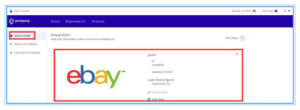
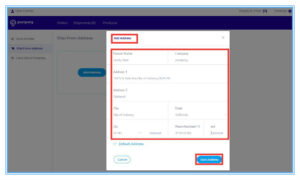
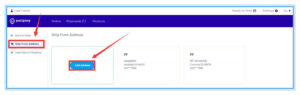
 2. Click Ship From Address to enter a sender address such as your warehouse.
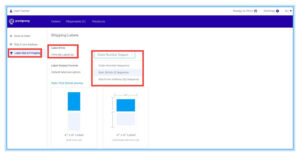
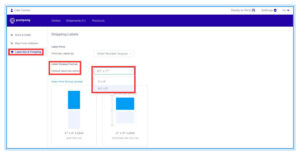
 3. Click “Label Size & Printing” to set up shipping label print format such as by order number or by SKU, as well as the size of the shipping labels.
OK, let’s start create shipments and print shipping labels for your eBay orders.

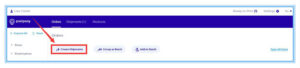
 First, Click the Order link.
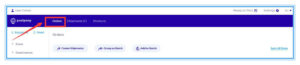
1. You can see all the orders on this page.
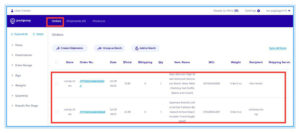
 2. You can choose orders from different stores,  you can also click ” Sync All Stores”
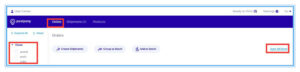
3. Tick the orders you want to create shipments for.
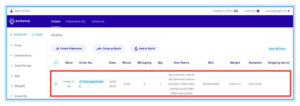
 4. Click “Create Shipments”
Second, click Shipments link.

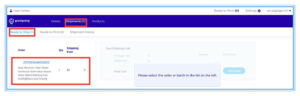
1. After clicking ” Create Shipments”, orders will be moved to “Ready to Ship” area under the Shipments page.

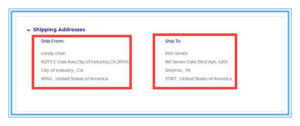
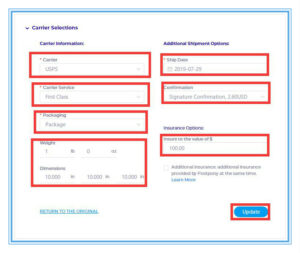
 2. Click “Ready to Ship”, here you can see all orders that need to be printed. Click the corresponding order, check related information, choose the carrier, fill in the necessary information, and then click “Update” and save.
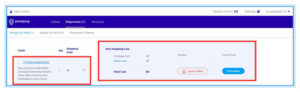
 3. After clicking “Update”, the shipping rate will change.
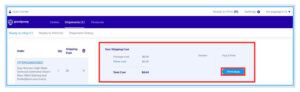
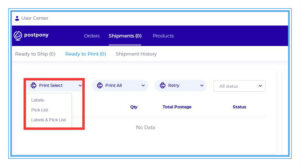
 4. Click “Ready to Print”, you can see all orders that need to be printed,  print shipping labels or picklists.
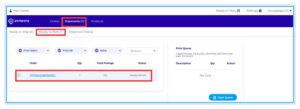
 5. Click  print button on the right side.
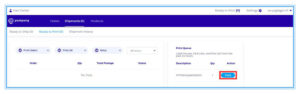
As soon as those steps are completed, your orders are fulfilled.

By the way, in order to pay the shipping label postage, currently only account balance can be used. More payment ways will be supported soon. See below the screenshot to deposit money to your account.

Should you have any probelms when you use this shipping software, please contact me to email will@postpony.com or find the livechat button on our website homepage https://www.postpony.com/


eBay erp 订单履行

上一篇Shopify order fulfilment tutorial下一篇 论跨境卖家2019下半年实现旺季大卖之最佳姿势

发表评论 取消回复

邮箱地址不会被公开。 必填项已用*标注

新闻

震惊!多家中国集装箱巨头被美国起诉,部分高管被捕2026年5月21日
特朗普已到北京!美国首批关税退款已到账,中国出口企业可受益?2026年5月14日
突发!特朗普9年后再访华,北美市场要变天了?2026年5月13日
3826个货柜被查!5H升级9H查验,从查货到查人2026年5月7日
警报!7月美线清关新规将强制实施,600个品类面临严苛查验!2026年4月29日

热门

美中专线使用教程5573 comments
美中快递,如果包裹被海关抽检到,如何缴纳关税?2587 comments
邮寄奢侈品:如何从美国邮寄奢侈品回国?905 comments
如何从美国寄文件、证件(身份证、护照等)回国?881 comments
美国发快递回国,如何填写海关申报价值?443 comments

相关文章

震惊!多家中国集装箱巨头被美国起诉,部分高管被捕2026年5月21日
特朗普已到北京!美国首批关税退款已到账,中国出口企业可受益?2026年5月14日
突发!特朗普9年后再访华,北美市场要变天了?2026年5月13日
3826个货柜被查!5H升级9H查验,从查货到查人2026年5月7日
警报!7月美线清关新规将强制实施,600个品类面临严苛查验!2026年4月29日
炸了!T86关停+FBA涨价,“直邮模式”即将终结?2026年4月23日
重磅!1660亿美元关税正式启动退款,涉及33万家企业2026年4月22日
突发!1660亿美元关税将被美国退还,计划4月20日启动2026年4月16日
特朗普10%关税或被推翻,对华关税再现松动信号2026年4月14日
美国密集发起337调查,中国13家公司被点名2026年4月10日

最近的文章

震惊!多家中国集装箱巨头被美国起诉,部分高管被捕2026年5月21日
特朗普已到北京!美国首批关税退款已到账,中国出口企业可受益?2026年5月14日
突发!特朗普9年后再访华,北美市场要变天了?2026年5月13日
3826个货柜被查!5H升级9H查验,从查货到查人2026年5月7日
警报!7月美线清关新规将强制实施,600个品类面临严苛查验!2026年4月29日

近期评论

  • Eugenemouct发表在《美中专线使用教程》
  • Eugenemouct发表在《美中专线使用教程》
  • Eugenemouct发表在《美中专线使用教程》
  • Eugenemouct发表在《美中专线使用教程》
  • 1发表在《美国发快递回国,如何填写海关申报价值?》

文章归档

  • 2026年5月
  • 2026年4月
  • 2026年3月
  • 2026年2月
  • 2026年1月
  • 2025年12月
  • 2025年11月
  • 2025年8月
  • 2025年7月
  • 2025年6月
  • 2025年5月
  • 2025年4月
  • 2025年3月
  • 2025年2月
  • 2025年1月
  • 2024年12月
  • 2024年11月
  • 2024年10月
  • 2024年9月
  • 2024年8月
  • 2024年7月
  • 2024年6月
  • 2024年5月
  • 2024年4月
  • 2024年3月
  • 2024年2月
  • 2024年1月
  • 2023年12月
  • 2023年11月
  • 2023年10月
  • 2023年9月
  • 2023年8月
  • 2023年7月
  • 2023年6月
  • 2023年5月
  • 2023年4月
  • 2023年3月
  • 2023年2月
  • 2023年1月
  • 2022年12月
  • 2022年11月
  • 2022年10月
  • 2022年9月
  • 2022年8月
  • 2022年7月
  • 2022年6月
  • 2022年5月
  • 2022年4月
  • 2022年3月
  • 2021年12月
  • 2021年7月
  • 2021年6月
  • 2021年5月
  • 2021年4月
  • 2021年3月
  • 2021年2月
  • 2021年1月
  • 2020年12月
  • 2020年11月
  • 2020年9月
  • 2020年8月
  • 2020年7月
  • 2020年6月
  • 2020年4月
  • 2020年3月
  • 2020年2月
  • 2020年1月
  • 2019年12月
  • 2019年11月
  • 2019年10月
  • 2019年9月
  • 2019年8月
  • 2019年7月
  • 2019年6月
  • 2019年5月
  • 2019年4月
  • 2019年3月
  • 2019年2月
  • 2019年1月
  • 2018年12月
  • 2018年11月
  • 2018年10月
  • 2018年9月
  • 2018年8月
  • 2018年7月
  • 2018年6月
  • 2018年5月
  • 2018年4月
  • 2018年3月
  • 2018年2月
  • 2018年1月
  • 2017年12月
  • 2017年11月
  • 2017年10月
  • 2017年9月
  • 2017年5月
  • 2017年4月

分类目录

  • 亚马逊
  • 公司新闻
  • 常见问题
  • 干货分享
  • 教程攻略
  • 最新通知
  • 渠道仓库
  • 用户案例
  • 行业资讯
  • 邮差小马海外仓

功能

  • 登录
  • 条目feed
  • 评论feed
  • WordPress.org

我们的服务

海外仓

快递打单


公司介绍

关于我们

登录注册


新闻中心

行业新闻

公司资讯


服务条款

服务条款

帮助中心

版权 2023 Postpony     粤ICP备2023084265号-1